Bizz View
Acupuncture Clinic Financial Model
Acupuncture Clinic Financial Model
Couldn't load pickup availability
A complete, investor-ready 10-year financial model for an acupuncture clinic, built in Excel and ready to adapt to your own numbers.
Overview
The Acupuncture Clinic Financial Model is a fully integrated Excel workbook for planning, funding and running an acupuncture clinic. It turns a short list of operating assumptions (treatments delivered, service line mix, average fee per treatment, cost of goods by service line, staff productivity and wages) into a 10-year income statement, balance sheet and cash flow statement, with monthly detail, three scenarios and a discounted cash flow valuation.
Revenue is built the way an acupuncture clinic actually earns it: treatments delivered split between acupuncture follow-Up treatments, initial consultations & assessments, and cupping, herbal & specialty treatments, each with its own average fee per treatment, less package discounts & insurance adjustments, plus herbal formulas & supplement sales and workshops & other income. Direct costs follow the work: associate & front desk pay that scales with treatments delivered, herbal & supply cost by service line, card & billing fees, and needles, moxa & treatment supplies, with the seasonality of the trade built into the monthly statements.
Whether you are opening an acupuncture clinic, adding an associate and herbal dispensary, applying for an SBA or bank loan, negotiating a lease or preparing next year's budget, the model gives you professional statements, KPIs and charts in minutes instead of weeks.
Who this model is for
- Owners and founders planning to open or expand an acupuncture clinic.
- Licensed acupuncturists preparing an annual budget, lease negotiation or loan application.
- Buyers, investors and lenders assessing an acquisition or a funding request.
- Consultants, accountants and fractional CFOs building plans for patients.
What the model does
- 10-year projections with a full income statement, balance sheet and cash flow statement that always balance.
- Revenue build by service line: acupuncture follow-Up treatments, initial consultations & assessments, and cupping, herbal & specialty treatments, each by share of treatments delivered and average fee per treatment, plus herbal formulas & supplement sales.
- Herbal & Supply cost modelled separately for each service line, so a change in sales mix flows straight into gross margin.
- Associate Acupuncturist staffing driven automatically by treatments delivered and productivity per team member.
- Practice KPIs on the Executive Summary: average fee per treatment, treatment margin %, labor %, occupancy cost % and revenue per employee.
- Base, Best and Worst scenarios on every driver, switched from a single drop-down.
- Capex plan for clinic build-Out & treatment rooms, treatment tables & linens, and heat lamps, e-Stim & cupping equipment with automatic depreciation and replacement; two term loans and a revolving credit line.
- Inventory, payables and receivables driven by days; monthly statements with seasonality, actual vs budget tracking and a rolling forecast.
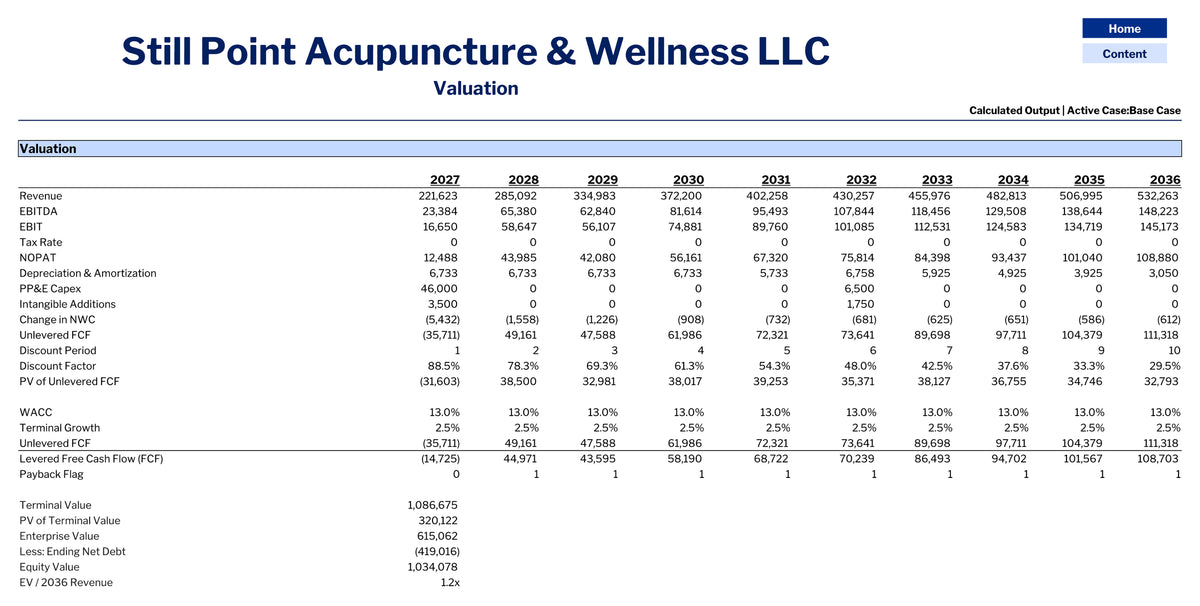
- DCF valuation with enterprise value, equity value, IRR, MOIC, payback and a WACC / growth sensitivity table.
Built for a Acupuncture Clinic business
The assumptions are not generic: revenue, direct costs and KPIs are modelled with the drivers this type of business actually runs on.
Revenue drivers
- Treatments Delivered per Year [treatments delivered]
- Acupuncture Follow-Up Treatments Mix [% of treatments delivered]
- Average Fee per Treatment - Acupuncture Follow-Up Treatments [USD / treatment]
- Initial Consultations & Assessments Mix [% of treatments delivered]
- Average Fee per Treatment - Initial Consultations & Assessments [USD / treatment]
- Cupping, Herbal & Specialty Treatments Mix [% of treatments delivered]
- Average Fee per Treatment - Cupping, Herbal & Specialty Treatments [USD / treatment]
- Package Discounts & Insurance Adjustments [% of treatment sales]
- Herbal Formulas & Supplement Sales per Treatment [USD / treatment]
- Workshops & Other Income [% of treatment sales]
Cost of revenue drivers
- Acupuncture Follow-Up Treatments Cost [% of service line sales]
- Initial Consultations & Assessments Cost [% of service line sales]
- Cupping, Herbal & Specialty Treatments Cost [% of service line sales]
- Card & Billing Fees [% of gross sales]
- Shop Supplies [USD / treatment]
- Needles, Moxa & Treatment Supplies [USD / treatment]
- Refunds & Late Cancellations Rate [% of treatment sales]
- Treatments Delivered per Associate Acupuncturist FTE per Year [treatments delivered / FTE]
- Associate Acupuncturist Cost ($/FTE) [USD / FTE]
Operating KPIs on the Executive Summary
Treatments Delivered, Initial Consultations & Assessments Mix, Average Fee per Treatment, Cupping, Herbal & Specialty Treatments Mix, Associate Acupuncturist FTE, Net Revenue per Treatment, Direct Cost per Treatment, Treatment Margin %, Total Labor % of Revenue, Occupancy Cost % of Revenue, Revenue per Employee.
What is inside the workbook
- Cover / Content / Instructions – Title page, clickable table of contents and step-by-step instructions.
- Input – Every assumption in one place: capex, funding, revenue and cost drivers, opex, staffing, working capital, tax, WACC and seasonality.
- Scenarios – Base, Best and Worst versions of every driver with a one-click scenario switch.
- Actuals – Monthly actual results, feeding the forecast and variance reports.
- Rev & COGS – Revenue build and cost of revenue, line by line, for 10 years.
- Personnel – Direct labor driven by volume and productivity, plus the salaried team with hire dates.
- Debt – Two term loans and a revolving credit line with automatic draw and repayment.
- Other Calc – Operating expenses, depreciation and amortization, fixed assets and working capital.
- Annual FS – 10-year income statement, balance sheet and cash flow statement, fully linked and balanced.
- Monthly FS – Monthly statements for any selected year.
- Forecast / Actual vs Budget – Actual-plus-forecast income statement and monthly / year-to-date variance analysis.
- Scenarios Analysis – The three scenarios side by side.
- Executive Summary – 5-year statements, margins, operating KPIs, ratios, trend lines and break-even analysis.
- Charts – Dashboard of eight charts: revenue and margins, cash, cost structure and operating KPIs.
- Valuation – DCF valuation with enterprise and equity value, IRR, MOIC, payback and a WACC / growth sensitivity table.
How to use it
- Open the Input sheet and replace the blue figures in the yellow cells with your own assumptions. Everything else recalculates.
- Use the Scenarios sheet to set how the Best and Worst cases differ from the Base case, and the drop-down to switch between them.
- Review Rev & COGS, Personnel, Debt and Other Calc to check the operating schedules.
- Read the results on Annual FS, Monthly FS, Executive Summary, Charts and Valuation.
- As the business trades, enter monthly results on Actuals to get the rolling forecast and the Actual vs Budget variance report.
The example inside the file
The workbook ships filled in with an illustrative company (Still Point Acupuncture & Wellness LLC) so that every sheet and chart is populated. The figures are sector-typical assumptions, not data from a real company, and are meant to be overwritten.
| 2027 | 2029 | 2031 | |
|---|---|---|---|
| Revenue | $221,623 | $334,983 | $402,258 |
| Gross margin | 64.9% | 65.1% | 64.8% |
| EBITDA | $23,384 | $62,840 | $95,493 |
| Net income | $10,766 | $40,587 | $66,221 |
Technical details
- Microsoft Excel workbook (.xlsx), no macros; works in Excel 2016 or later and Microsoft 365.
- 20 linked sheets, 10-year annual horizon with monthly statements for any selected year.
- Three scenarios (Base, Best, Worst) with a single switch; colour-coded inputs (blue on yellow).
- Currency label and first financial year are inputs, so the model can be re-based in seconds.
- All formulas are open and editable; nothing is locked or hidden behind passwords.